MLflow
MLflow is an open-source platform designed to streamline the machine learning (ML) lifecycle. It helps data scientists and engineers manage experiments, track model performance, and deploy models efficiently. Its flexibility allows integration with popular ML frameworks like TensorFlow, PyTorch, and Scikit-learn, making it easy to integrate into any ML workflow.
Learn more in the official MLflow documentation: https://mlflow.org/docs/latest/
Deploying MLflow in LUMI-K
MLflow in LUMI-K can be deployed using Helm either from the LUMI-K web user interface in the Software Catalog or via the Helm CLI. In both cases you can add custom values to override default Helm chart values as explained in the values section.
Using the Software Catalog
-
Create a project in LUMI-K as explained here.
-
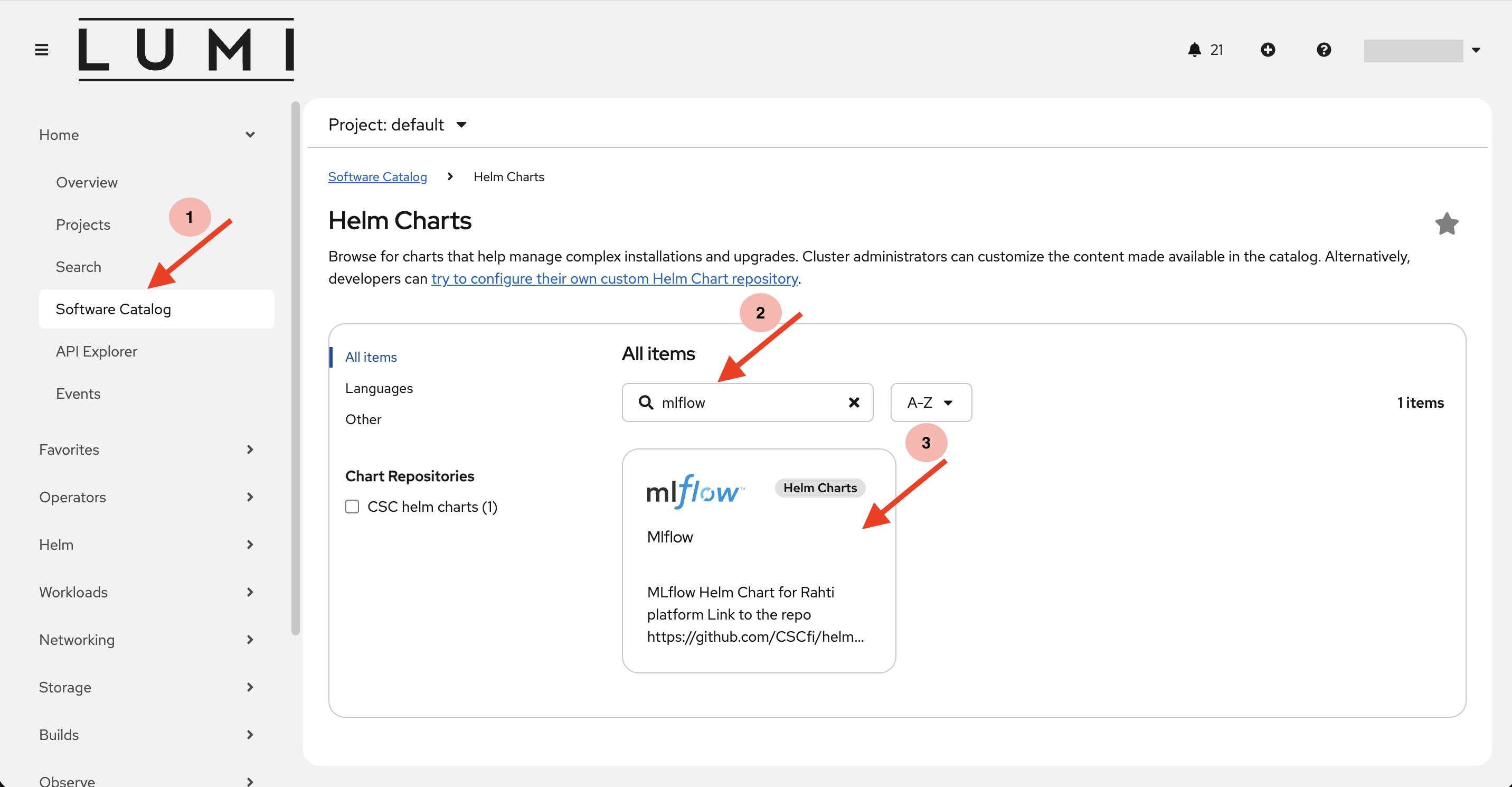
Navigate to MLflow Helm Chart in the LUMI-K Software Catalog:
- On the menu in the left, click on Software Catalog under the Ecosystem section.
- Search for MLflow in the search box.
- Click on the MLflow Helm chart.
-
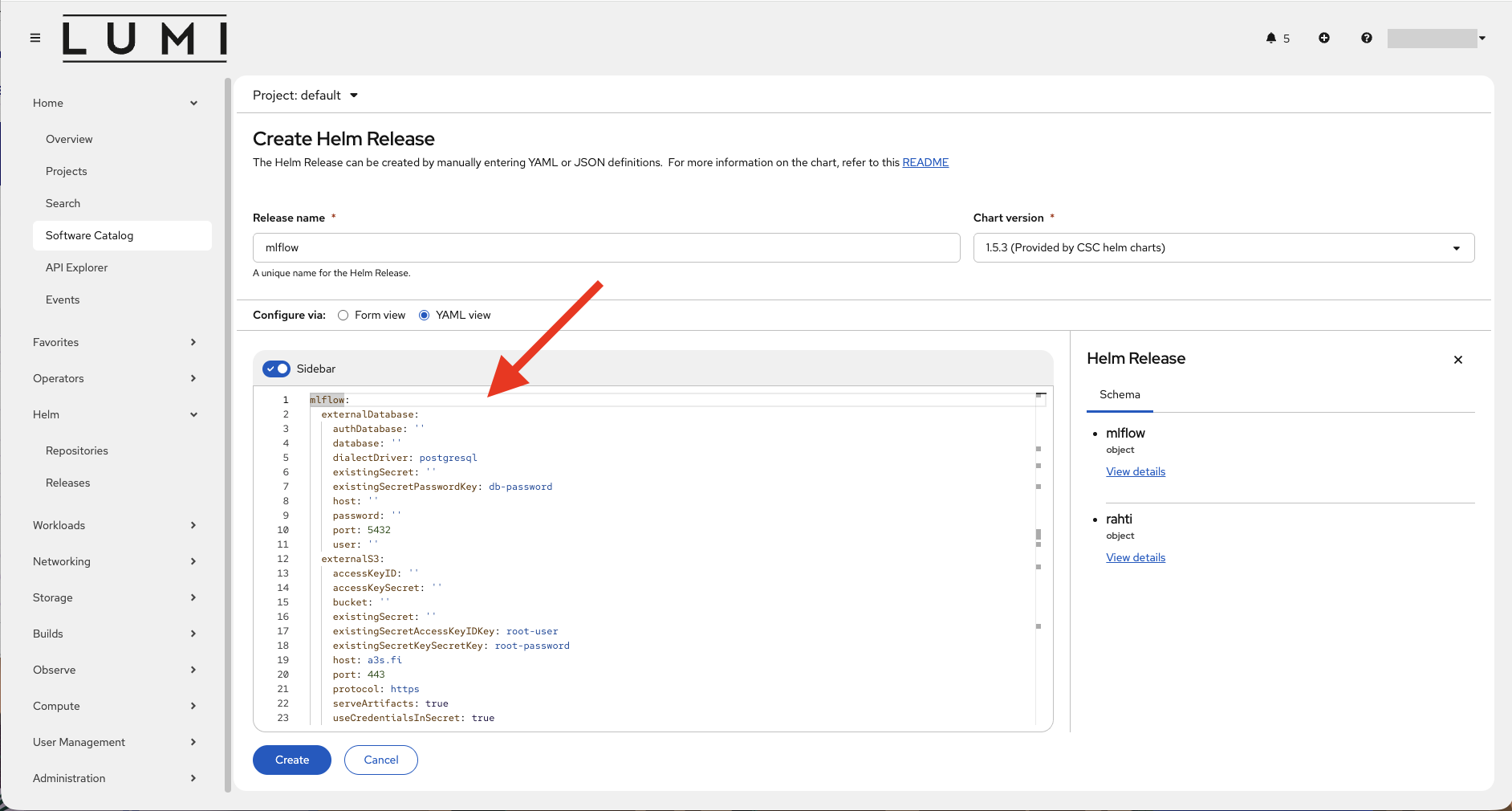
Click on the create button. This will open the "Create Helm Release" form.
- Give a custom name to your Mlflow Helm release in the "Release name" dialogue box.
-
Under the "configuration via Form view / YAML view" section, add your custom values to override the default Helm chart values. Overriding default values is explained here.
-
Click on the create button to install a Helm release.
- Navigate to Releases under the Helm section in the same Ecosystem section in left-side menu. There you can see the status of your Mlflow release. Make sure you are in the correct LUMI-K project. If everything went well, the status column should show "Deployed".
- If the MLflow tracking server was exposed via a Ingress object, navigate to the Ingress section under Networking from the left-side menu. Here you can see your Ingress endpoint under the Location column. Use this endpoint to access the MLflow tracking server.
Using the Helm CLI
- Install Helm CLI tool in your local workstation following the instructions here.
- Login to LUMI-K using the oc CLI tool as explained here.
- Create a project in LUMI-K:
- Add the cscfi Helm chart repository: Make sure we get the latest charts from the repo before proceeding:
- Install the MLflow Helm chart from cscfi repo:
You can add your custom values to override the default chart values using the
--setoption in the above command. If there are multiple custom values, you can put all the custom values in a single values.yaml file and refer to it in the above command using the-f values.yamloption. Overriding default values is explained here. - To check the status of the Helm deployment: The status field should show "Deployed" in case of a successful Helm deployment.
- If the MLflow tracking server was exposed via an Ingress object (see the Ingress section), use the following command to get the tracking server endpoint: The endpoint is shown in the HOST/PORT column. LUMI-K (OpenShift) automatically creates this Route from the Ingress.
Overriding the Default Values
The MLflow Helm chart from cscfi (and the dependent Mlflow chart from MLflow Community) have multiple default values that can be overriden by the end user according to their requirements. Some of the common replaced values are explained below:
Database:
Using a database as the MLflow backend store provides a scalable, reliable, and query-efficient foundation for experiment tracking and model lifecycle management. By default, MLflow has a built-in local SQLite database to store metadata. However, for production environments it is recommended to use an external database instance which have standard enterprise capabilities such as backups, and high availability. To use an external database, the following value needs to be set:
mlflow:
  mlflow:
    backendStoreUri: "postgresql://{USERNAME}:{PASSWORD}@{DB_PUBLIC_IP/DOMAIN}:5432/mlflow"
Note
The double mlflow nesting is intentional: the cscfi wrapper chart passes values to a dependency subchart that is also named mlflow, and the subchart groups its application settings under its own mlflow section. Values placed at the wrong nesting level are silently ignored by Helm.
Make sure to replace the correct values for the postgresql variables USERNAME, PASSWORD, DB_PUBLIC_IP/DOMAIN. You can also store the database URI in a Kubernetes Secret to avoid exposing credentials in values files:
oc create secret generic mlflow-db-secret \
  --namespace <your project name> \
  --from-literal=uri="postgresql://{USERNAME}:{PASSWORD}@{DB_PUBLIC_IP/DOMAIN}:5432/mlflow"
S3 Storage Backend:
Using an object store such as LUMI-O via S3 as the MLflow artifact storage backend provides durable, highly available, and virtually unlimited storage for large model artifacts, datasets, and logs. It centralizes artifact management for all experiments and environments, enabling scalable, cost‑effective retention and easy sharing of artifacts across teams and infrastructure.
The MLflow helm chart values that need to be set for S3 connection with LUMI-O are as follows:
mlflow:
  mlflow:
    defaultArtifactRoot: "mlflow-artifacts:/"
    artifactsDestination: "s3://my-bucket/mlflow"
  env:
    - name: MLFLOW_S3_ENDPOINT_URL
      value: "https://lumidata.eu"
    - name: AWS_DEFAULT_REGION
      value: "lumi-prod"
    - name: AWS_ACCESS_KEY_ID
      value: "abc123"
    - name: AWS_SECRET_ACCESS_KEY
      value: "xxxx"
Authentication:
MLflow has a built-in HTTP Basic Authentication, however, it needs to be enabled and requires a Flask secret key Add the following with your own values:
authentication:
  enabled: true

  adminPassword: I_am_a_long_password_123
  database_uri: ""

mlflow:
  server:
    value_options:
      app_name: "basic-auth"

  env:
    - name: MLFLOW_FLASK_SERVER_SECRET_KEY
      valueFrom:
        secretKeyRef:
          name: mlflow-auth-secret
          key: secret-key
    - name: MLFLOW_AUTH_CONFIG_PATH
      value: /etc/mlflow/auth/basic_auth.ini

  extraVolumes:
    - name: auth-config
      secret:
        secretName: mlflow-auth-config
  extraVolumeMounts:
    - name: auth-config
      mountPath: /etc/mlflow/auth
      readOnly: true
Ingress
An Ingress object needs to be created to expose the MLflow tracking server to the internet. The Ingress is disabled by default, so it must be explicitly enabled. Add the following values, replacing the host field with your own domain name:
mlflow:
  ingress:
    enabled: true
    hosts:
      - host: mlflow-my-namespace.apps.lumi-k.eu
        paths:
          - path: /
            pathType: Prefix

  server:
    value_options:
      allowed_hosts: "mlflow-my-namespace.apps.lumi-k.eu"
      cors_allowed_origins: "https://mlflow-my-namespace.apps.lumi-k.eu"
Garbage Collection
MLflow only soft-deletes experiments and runs — deleted items remain in the backend store and artifact storage until they are permanently removed. The chart provides an optional CronJob that periodically runs mlflow gc. It is disabled by default and can be enabled with:
The chart's default pod affinity co-schedules the garbage collection job on the same node as the tracking server, which is required when using the default persistent volume storage (the volume can only be attached to one node at a time).
Accumulated
Since there are multiple custom values, it is better to use a single values file rather than setting them inline. This can be easily done using a values.yml file as shown below and referring to it in the helm install command using the -f option.
authentication:
  enabled: true
  adminPassword: I_am_a_long_password_123
  database_uri: ""

mlflow:
  server:
    value_options:
      app_name: "basic-auth"
      allowed_hosts: "mlflow-my-namespace.apps.lumi-k.eu"
      cors_allowed_origins: "https://mlflow-my-namespace.apps.lumi-k.eu"

  env:
    - name: MLFLOW_FLASK_SERVER_SECRET_KEY
      valueFrom:
        secretKeyRef:
          name: mlflow-auth-secret
          key: secret-key
    - name: MLFLOW_AUTH_CONFIG_PATH
      value: /etc/mlflow/auth/basic_auth.ini
    - name: MLFLOW_S3_ENDPOINT_URL
      value: "https://lumidata.eu"
    - name: AWS_DEFAULT_REGION
      value: "lumi-prod"
    - name: AWS_ACCESS_KEY_ID
      value: "abc123"
    - name: AWS_SECRET_ACCESS_KEY
      value: "xxxx"

  extraVolumes:
    - name: auth-config
      secret:
        secretName: mlflow-auth-config
  extraVolumeMounts:
    - name: auth-config
      mountPath: /etc/mlflow/auth
      readOnly: true

  mlflow:
    backendStoreUri: "postgresql://{USERNAME}:{PASSWORD}@{DB_PUBLIC_IP/DOMAIN}:5432/mlflow"
    defaultArtifactRoot: "mlflow-artifacts:/"
    artifactsDestination: "s3://my-bucket/mlflow"

  garbageCollection:
    enabled: true
    schedule: "0 2 * * 0"
    olderThan: "30d"

  ingress:
    enabled: true
    hosts:
      - host: mlflow-my-namespace.apps.lumi-k.eu
        paths:
          - path: /
            pathType: Prefix